 |
 |
 |
|
|
|
Show Amount Invoiced Screen
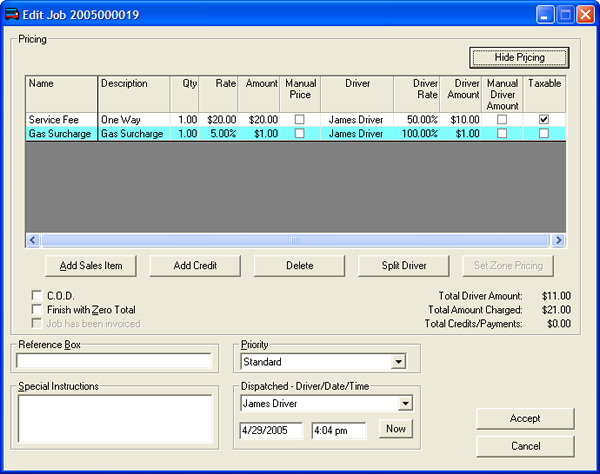
If the Total Amount Charged is $0.00, then the "Status" of the job on the Dispatch Screen will be "$$$". This is to prevent the job from being closed before you can enter the amount you want to charge. If you have setup your zone-to-zone pricing, then the job will automatically calculate the "Service Fee" for you.
You can setup zone-to-zone pricing by clicking the "Set Zone Pricing" button on this screen (or you can go to Setup>Edit Price Grid for Zone Pair). Before the job can be removed from the dispatch screen, the job has to either have a Total Amount Charged great than zero, or the "Finish with Zero Total" checkbox needs to be checked. You can edit the amount you are charging on a job by job basis by double-clicking in the "Rate" field for the "Service Fee" sales item & typing the amount you want to charge.